How to Find Your Child Care Tax Document
Due to switching over to a new system in 2025, there are multiple ways that you may need to obtain your Child Care Tax Documents for tax purposes. Please read all information and instructions below!
Skyward
If your child attended PTC at an Elementary School from January - June 2025, you will need to reach out directly to TerriSzymanski@wlcsd.org for a Skyward Tax Statement and include the following information:
- Your student(s) name
- What school they attended for PTC
Arux
If your student(s) attended Prime Time Care at the ECC from January - December 2025, Summer Care 2025, or PTC from August - December 2025 you may access your tax statement through your Arux account.
Please note: We will not be sending out tax statements that can be accessed by you in your Arux account.
Accessing your Tax Statement(s) in Arux
To access the ARUX Tax Document log into your ARUX account. https://wlcsd.arux.app/
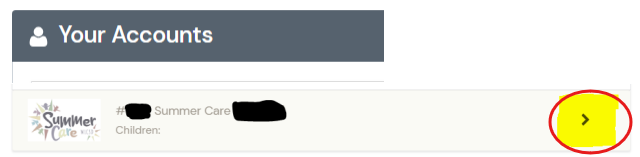
In this example the account is only for Summer Care. You will need to select the “>” – same as if you were going to do a schedule change. This will open your dash board. Please see below.
Next, you will click 'Download Tax Information' as shown below:
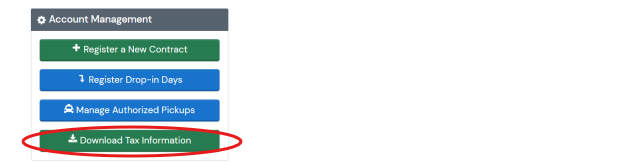
This will create a PDF of the payments made by the PRIMARY account holder during the 2025 year. If payment was made by a third party vendor you will not receive a report. Split families with split contracts your report will be unique to your account.